Merchant Text Notifications
Last updated: September 17, 2026
This page describes a messaging program in which NEXA Technologies LLC sends operational text messages to the business owners who use NexaBooking, about their own NexaBooking account.
The opt-in interface shown below is part of the NexaBooking merchant dashboard, at Shop Settings > Text notifications, and appears for a merchant once NEXA Technologies LLC switches the notification service on for that account. Operational messages are sent only after a merchant enters a mobile number they control, reads the disclosure in full, ticks the box — which is never pre-selected — and saves the preference. No operational text messages are being sent to any merchant today.
Two different programs
NexaBooking is involved in text messaging in two distinct ways, and this page covers only the second of them.
- Messages to a business’s customers are sent under that business’s own name and brand, about that customer’s appointment. NEXA Technologies LLC supplies the technology; the business is the sender, obtains its own consent, and each business publishes its own messaging terms.
- Messages to a business owner — this program — are sent by NEXA Technologies LLC under the NEXA name, to the merchant, about the merchant’s own account. Every message begins with NEXA: so the sender is unambiguous.
Consent to one is never consent to the other. A merchant who opts in here has not agreed to anything on their customers’ behalf, and a customer’s consent to their own salon never authorises a message under the NEXA name.
Who receives these messages
Only a business owner or an authorised operator of a NexaBooking account, at a mobile number that person enters themselves. Messages are never sent to a business’s customers under this program, and a merchant’s customers are never enrolled in it.
What we send
Operational notifications about the merchant’s own account only:
- A new appointment request has arrived for the merchant’s business
- A booking conflicts with the merchant’s existing schedule
- An appointment was automatically confirmed
- A customer accepted a new time the merchant offered
- A customer requested a cancellation, or cancelled
- A customer rescheduled, or a reschedule needs the merchant’s review
- An appointment could not be written to the merchant’s connected calendar
We send no marketing, promotional, or advertising messages under this program.
A message carries the merchant’s business name, what happened, and a link to their dashboard — and nothing else. It never contains a customer’s name or phone number. The details are in the dashboard, behind the merchant’s own login, which is what the link is for.
Sample messages
NEXA: Spa Harmony 新预约
时间:9月20日 晚上8:00
时长:60分钟
更多详情请登录后台:
https://app.nexabooking.ai/dashboard
回复 STOP 退订,回复 HELP 获取帮助。
NEXA: Spa Harmony 预约时间冲突 时间:9月20日 晚上8:00 时长:60分钟 更多详情请登录后台: https://app.nexabooking.ai/dashboard 回复 STOP 退订,回复 HELP 获取帮助。NEXA: Spa Harmony 预约已自动确认 时间:9月20日 晚上8:00 时长:60分钟 更多详情请登录后台: https://app.nexabooking.ai/dashboard 回复 STOP 退订,回复 HELP 获取帮助。NEXA: Spa Harmony 预约已取消 时间:9月20日 晚上8:00 时长:60分钟 更多详情请登录后台: https://app.nexabooking.ai/dashboard 回复 STOP 退订,回复 HELP 获取帮助。NEXA: Spa Harmony 日历同步失败 更多详情请登录后台: https://app.nexabooking.ai/dashboard 回复 STOP 退订,回复 HELP 获取帮助。
How a merchant opts in
Consent is given in the merchant’s own NexaBooking dashboard, under Shop Settings → Text notifications. The merchant enters the mobile number they want notifications at and ticks a checkbox that is not pre-selected.
- Sign in to the NexaBooking dashboard.
- Open Shop Settings.
- Open Text notifications.
- Enter a mobile number the merchant owns.
- Read the complete disclosure shown beside the checkbox.
- Tick the checkbox, which is unticked by default.
- Select Agree and save.
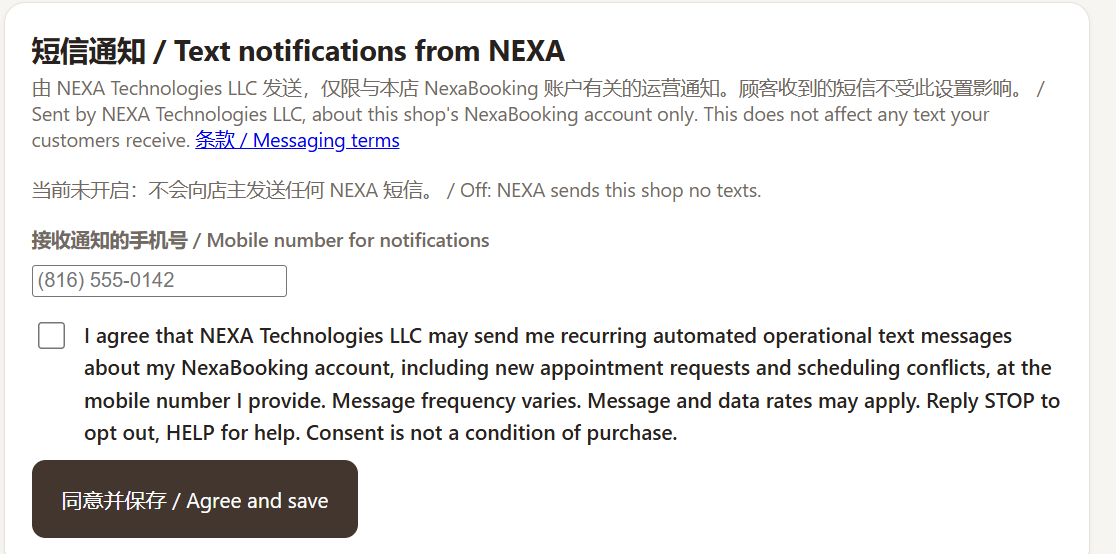
The checkbox reads, in full:
I agree that NEXA Technologies LLC may send me recurring automated operational text messages about my NexaBooking account, including new appointment requests and scheduling conflicts, at the mobile number I provide. Message frequency varies. Message and data rates may apply. Reply STOP to opt out, HELP for help. Consent is not a condition of purchase.
Consent is not a condition of purchase or of using NexaBooking. A merchant who never ticks the box keeps the full product and simply receives no text messages. There is no other way to enrol: consent cannot be given by a salesperson, inferred from a signup, or carried over from any other agreement.
Each consent is recorded with the mobile number it applies to, the exact wording shown (versionmerchant-ops-v2, stored with a cryptographic digest of the text), who gave it, how, and when. Messages are sent only to the number on that record.
How a merchant opts out
Reply STOP to any message to stop all messages under this program. A merchant can also withdraw consent at any time in Shop Settings, which stops the messages immediately and records the withdrawal. Opting out does not affect the merchant’s account, their bookings, or anything their customers receive.
Reply HELP for help, or email hello@nexabooking.ai.
Message frequency
Message frequency varies, and depends on how much booking activity the merchant’s business has.
Message and data rates
Message and data rates may apply.
Carrier disclaimer
Wireless carriers are not liable for delayed or undelivered messages. Message delivery depends on carrier and network availability.
Privacy
Mobile numbers and SMS consent collected for this program are never sold, rented, or shared with third parties or affiliates for marketing or promotional purposes. No mobile information is shared with third parties or affiliates for their own marketing.
See our Privacy Policy for how we handle personal and mobile information, and our Terms for the terms that govern our services generally.
Changes
We may update this page or change or discontinue this program. The current version will be posted here. Questions may be sent to hello@nexabooking.ai.